
Theming-Service
📘 Developer Guide
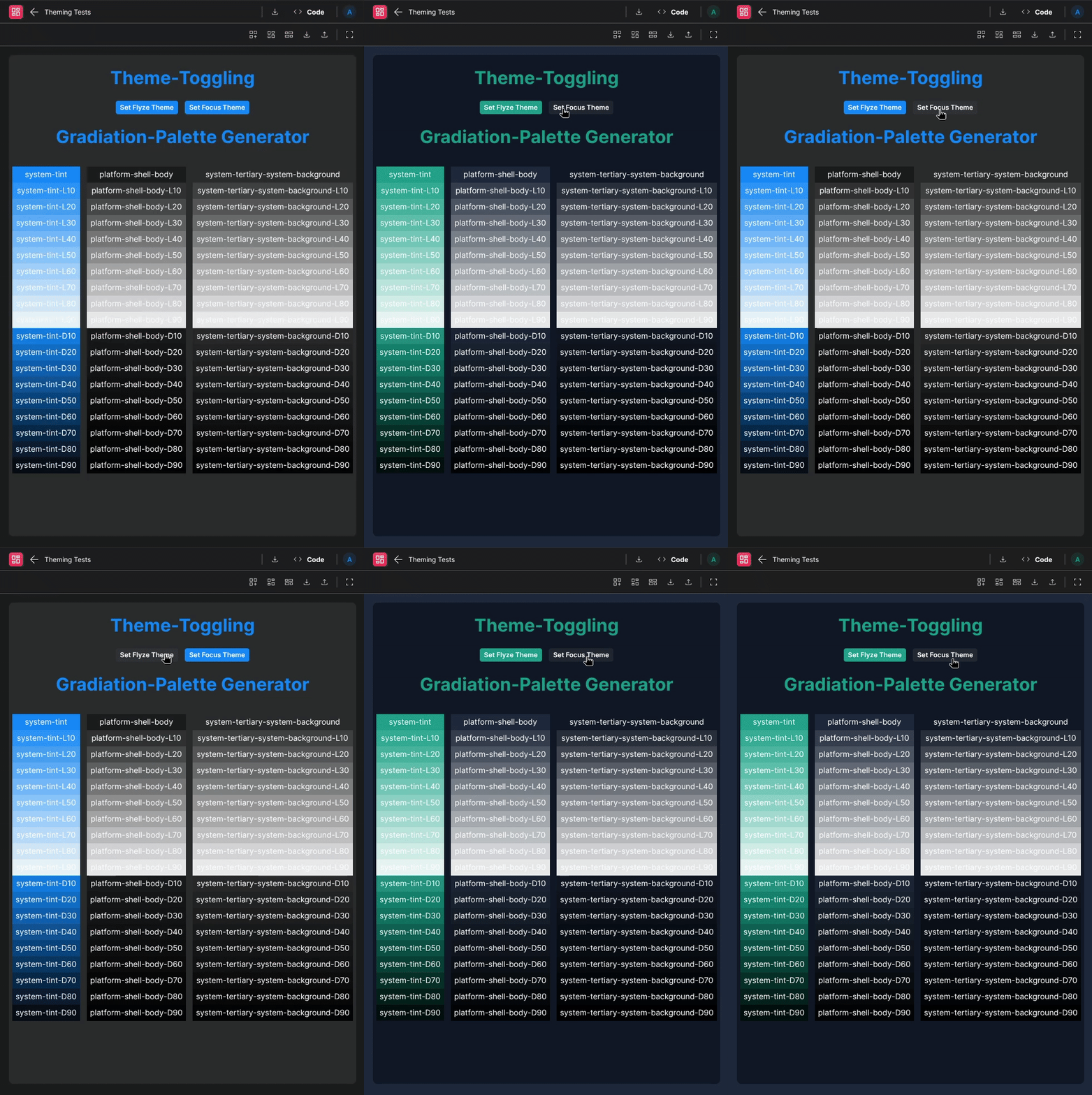
With the Flyze Theming Service, you are able to easily provide multiple custom themes for your Apps/Dashboards and toggling between these. It also helps you generate Gradiations of specific colors if needed.
🔁 Example
Runtime
🏗️ Methods
| Method | Description | Parameters | Returns |
|---|---|---|---|
getCurrentTheme |
Gets the current selected Theme | - | Returns an object containing Theme-Information{ theme: string; variation: string} |
getThemeConfiguration |
Gets a specific theme configuration | e.g. flyze themeName: string |
Returns an object containing all theme variable settings{light: {...}, dark: {...}} |
getThemeValue |
Gets a specific theme color value | e.g. flyze, dark.colors.colors-flyze-default themeName: string, key: string |
Returns the specific colorstring |
getThemeValueGradiation |
Gets a specific color gradiation | e.g. flyze, dark.colors.colors-flyze-default, { gradiationPercentage: 50, gradiationType: 'lighter' } themeName: string, key: string, gradiation: { gradiationType: "lighter" | "darker", gradiationPercentage: Number } |
Returns the specific color color-mix gradiationstring |
getThemeValue |
Gets a specific theme color value | e.g. flyze, dark.colors.colors-flyze-default themeName: string, key: string |
Returns the specific colorstring |
setTheme |
Sets the current selected Theme and its variation | e.g. flyze, dark themeName: string, variation: string |
- |
setThemeConfig |
Sets a specific theme configuration | e.g. flyze, { dark: { system: { "system-tint": "#AA00AA }}} themeName: string, color: { variation: {...} } |
- |
setRootVariable |
Directly sets/overrides a variable in the root style sheet | e.g. a-new-color, #AABBCC variableName: string, value: string |
- |
setMultipleRootVariables |
Directly sets/overrides multiple values in the root style sheet | e.g. { "a-new-color": "#AABBCC", "another-color": "rgba(0,127, 12, 5)" }variables: Record<string,string> |
- |
removeRootVariable |
Removes a variable from the root style sheet | e.g. a-old-color variableName: string |
- |
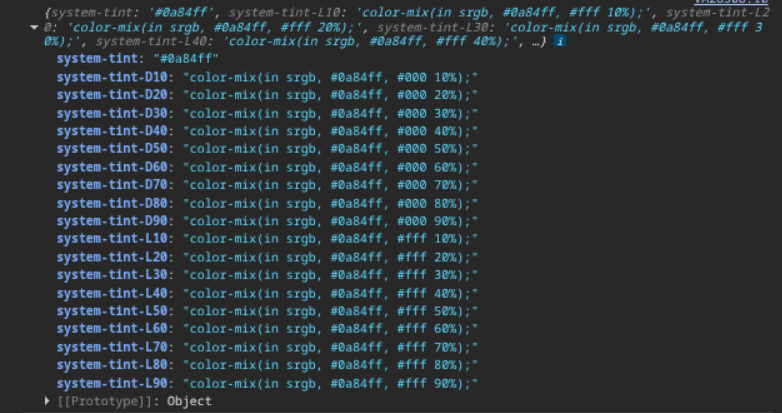
generateGradiationPalette |
Generates a gradiation palette from a specific variable color of a theme | e.g. flyze, dark.colors.colors-flyze-default themeName: string, key: string |
An object containing gradiations of the specified variable from L10/D10 - L90/D90 (L: Lighter, D: Darker) |
🫥 Runtime Properties
| Property | Label | Description |
|---|---|---|
customPreferredColorScheme |
Describes what color scheme the user preferesdark | light | auto |
|
customPreferredColorScheme$ |
Holds the custom preferred color scheme of the user as RXJS-Stream (Observable) |
Describes what color scheme the user preferesdark | light | auto |
detectedPreferredColorScheme |
Holds the automatic detected preferred color scheme of the user | Describes what color scheme the user is currently using in his browserdark | light |
detectedPreferredColorScheme$ |
Holds the automatic detected preferred color scheme of the user as RXJS-Stream (Observable) |
Describes what color scheme the user is currently using in his browserdark | light |
preferredColorScheme |
Holds the preferred color scheme of the user | Depending on customPreferredColorScheme (Prioritized) and detectedPreferredColorSchemedark | light |
preferredColorScheme$ |
Holds the preferred color scheme of the user as RXJS-Stream (Observable) |
Depending on customPreferredColorScheme (Prioritized) and detectedPreferredColorSchemedark | light |
theme$ |
Holds the current theme as RXJS-Stream (Observable) |
e.g. flyze | my-fancy-theme |
theme |
Get/Set the current theme. | Only updates the used theme if the theme exists. |
🎨 CSS Variables
:root {
    --system-label: #ffffff;
    --system-label-secondary: #8e8e93;
    --system-label-tertiary: #aeaeb2;
    --system-label-quaternary: #c7c7cc;
    --system-placeholder-text: #8e8e93;
    --system-seperator: #545458;
    --system-opaque-seperator: #545458;
    --system-link: #0984ff;
    --system-system-background: #000000;
    --system-secondary-system-background: #1c1c1e;
    --system-tertiary-system-background: #2c2c2e;
    --system-system-grouped-background: #000000;
    --system-secondary-system-grouped-background: #1c1c1e;
    --system-tertiary-system-grouped-background: #2c2c2e;
    --system-system-fill: #787880;
    --system-secondary-system-fill: #787880;
    --system-tertiary-system-fill: #787880;
    --system-quaternary-system-fill: #787880;
    --system-dark-text: #ffffff;
    --system-light-text: #000000;
    --system-tint: #0a84ff;
    --system-white-text: #ffffff;
    --system-black-text: #000000;
    --system-tint-50: #0a84ff;
    --system-tint-95: #0a84ff;
    --system-tint-5: #0a84ff;
    --system-label-default: #ffffff;
    --system-quartery-system-background-color: #f8f8f8;
    --system-stroke: #ebebeb;
    --colors-system-gray: #8e8e93;
    --colors-system-red: #ff453a;
    --colors-system-orange: #ff9f0a;
    --colors-system-yellow: #ffd60a;
    --colors-system-green: #30d158;
    --colors-system-mint: #63e6e2;
    --colors-system-teal: #40c8e0;
    --colors-system-cyan: #64d2ff;
    --colors-system-blue: #0a84ff;
    --colors-system-indigo: #5e5ce6;
    --colors-system-purple: #bf5af2;
    --colors-system-pink: #ff375f;
    --colors-system-brown: #ac8e68;
    --colors-system-gray-2: #636366;
    --colors-system-gray-3: #48484a;
    --colors-system-gray-4: #3a3a3c;
    --colors-system-gray-5: #2c2c2e;
    --colors-system-gray-6: #1c1c1e;
    --colors-flyze-orange: #fe8900;
    --colors-flyze-pink: #fe008c;
    --colors-flyze-default: #ff4842;
    --platform-shell-body: #1c1c1e;
    --platform-shell-header: #1e1e1e;
    --platform-shell-sidenav: #1e1e1e;
    --platform-shell-asset-tree: #2c2c2e;
    --platform-shell-dashboard-header: #2c2c2e;
    --platform-flyze-success: #30d158;
    --platform-flyze-info: #0a84ff;
    --platform-flyze-warning: #ffd60a;
    --platform-flyze-error: #ff453a;
    }
⌨️ Programmatical Data
How to set a custom theme via scripting
// ⚙️ Define the theme configuration
fyzPlatform.theming.setThemeConfig('focus', {
    dark: {
        system: { "system-tint": "#0d9488", "system-tertiary-system-background": "#111827" },
        platform: { 'platform-shell-body': "#1e293b" },
    }
});

// 💱 Set the theme
fyzPlatform.theming.setTheme(theme ='focus', 'dark');
How to generate gradiations of a specified theme color
Generate a whole palette of a color
// ⚙️ Define the theme configuration
const tintPalette = fyzPlatform.theming.generateGradiationPalette('flyze', 'dark.system.system-tint');
// 🧑💻 Do something with it
console.log(tintPalette);
Returns a key value object:
Get a specific gradiation of a color
// ⚙️ Get a gradiation of a theme color
const tint42 = fyzPlatform.theming.getThemeValueGradiation('flyze', 'dark.system.system-tint', { gradiationPercentage: 42, gradiationType: 'lighter'})
// 🧑💻 Do something with it (e.g. update a HTML-Brick)
const brick = fyzBrick.cRef.getConfig();
brick.code = `<div style="color:${tint42}">I am a gradiation of tint 🤓</div>`
fyzBrick.cRef.mergeConfig(brick);
